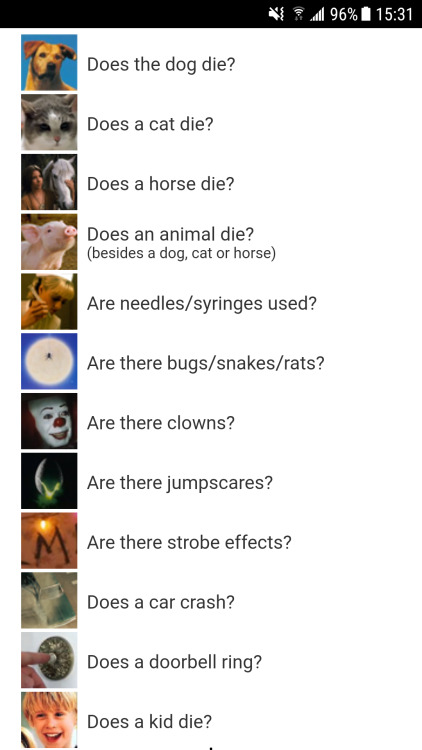
I’ve seen a bunch of people in the notes concerned (like I was) of comparisons of members of the lgbt to dogs: but upon visiting their website I was reassured that they monitor a variety of content, including (but not limited to):
THIS IS A GOOD SITE
Yeah, this site is literally so people can check for content they don’t want to see…or in some cases content that would make them physically or mentally ill. (I have strobe issues myself…)
It’s highly useful for a lot of people.
I had no idea they warned for strobe effects, that’s awesome! They give me headaches and nausea.
They frequently add more categories, it seems – there have been more added just about every time I’ve visited the site. And they’re clearly open to suggestions, as the twitter exchange in the OP shows 😀
executive dysfunction is telling yourself for two and a half hours that you need to shower bc you smell like your workplace and you absolutely Cannot do Anything Else until you shower, doing Any Other Thing before showering is illegal!!! but you still haven’t for some reason??? you’ve just been sitting on your bed in a towel scrolling tumblr for 2+ hours thinking “I need to shower right now immediately” and growing increasingly frustrated that you are still not clean and you haven’t eaten or done your laundry either
ok actually no I’m reblogging this because a) I am clean now (and I smell amazing, thank you), and b) I had a heckin Realize and I wanted to share it with y’all in the hopes it’ll help someone else with a brain like mine.
I figured something out about myself a long time ago– it’s only just now occurred to me that I was in fact solving a problem caused by executive dysfunction, and I haven’t been implementing this solution lately because my brain went “that’s a relatively new term to me and therefore a Different problem that requires a Different solution”. thanks a lot, brain.
anyway, long long ago, before I knew these fancy schmancy Official words, the problem, as I phrased it to myself, was such:
sometimes I get Stuck. I was doing something, or on my way to doing something, and then… I just. got stuck.
“Stuck” looks like refreshing my feed or dashboard repeatedly. or it looks like staring at a spot on the wall. or chewing my fingernails. or picking at a stubborn sticker. all the while, my brain drifts through various unrelated topics I wouldn’t be able to recall if asked. sometimes I can get Stuck for hours before realizing I am Stuck. sometimes I get so Stuck that I go to bed that way (feeling especially bad for being unproductive) and I have to just reset everything by sleeping.
one day I asked myself, “why is this happening? why am I stuck, right now, at this moment in time?” the answer, as it turns out, was pretty simple: I was trying to make a decision, and I got distracted. I haven’t moved forward because I haven’t answered that one question or made up my mind.
let me rephrase this in terms of executive dysfunction: many people have expressed that it feels like knowing you need to do a thing but not feeling “ready” to do it. many with ADHD may also be familiar with the feeling of needing things to be “just so” before you embark on a task- you need your setup to look a certain way, or you need to set a timer, or have the right music playing, etc.
when I get Stuck it’s often because I got lost somewhere in that setting-up process, and my brain took the opportunity to nyoom off into Distraction Town.
getting myself Unstuck is solved, 95% of the time, by tracing my steps back to the original decision I was trying to make- often something small and inane- and then troubleshooting from there. (out loud! verbal processing is totally punk.)
“what was I trying to do?”
“was I trying to decide between two things?”
(the answer’s usually yes.)
“what were they?”
“okay, let’s decide.
“okay, that’s settled. let’s move on.”
and then I am free as a bird to nyoom in the direction of The Thing I Wanted To Do All Along, in the amazingly disorganized, scattered, yet rapid-fire way that I do many things.
so!!! in the case of my first post, where I hadn’t showered for 2 hours? turns out I had been trying to decide what music to listen to in the shower. (another hack: my chances of getting Stuck while showering decrease by 75% if I have music playing to help me keep track of time.) I couldn’t immediately make up my mind, got lost in thought, got distracted, and drifted. once I stopped and asked- “why am I stuck?”- then I remembered- “oh yeah! I wanted to listen to music”- and then decided- “I want to listen to Daft Punk’s Discovery album”- I was finally heckin able to shower. and also eat, and also throw my clothes in the dryer.
and may I add I only zoned out once, during the slow part of “One More Time.” 😛
I’m not saying this is a foolproof method. sometimes I don’t have a reason for being stuck, and that’s okay! I’m also not saying this is how every adhd brain works. it’s just how my brain works, and I’m sure there’s at least a few who can relate. for those few, I hope this helps!!
a lot of people are reblogging the original post without the update and leaving frustrated comments and that makes me sad! if I can find ways to hack my brain than so can you! executive dysfunction is a real and frustrating challenge, but don’t buy the lie that there’s no way to work with it or around it!!!
!!!!
This sounds really useful and for some reason, I’m also really happy to find out that I’m not the only person who uses music to keep track of time
i got stuck in one shoe once for six hours. had the other shoe and sock right there, but just. doop de doo.
iirc in the end i just went “ok we don’t have to climb Mt. Put On Shoes. But let’s pick up that sock.” then i put on that sock, solemnly in the knowledge that the shoe was no longer a goal. Then the shoe went on, and had a laugh at how Mt. Shoe didn’t even see me coming.
getting stuck in a mudhole is a mofo. change gears to get out of the hole and do that, rather than thinking in terms of continuing to drive to your destination while in the hole. at least, that’s how i do it.
i can’t do Errand but i can sure as hell leave the house, and if i leave the house, eventually Errand will sneak up on me and i won’t have fretted myself to death about it for hours.
A lot of the time when people give advice intended to relieve anxiety, they suggest doing “relaxing” things like drawing, painting, knitting, taking a bubble bath, coloring in one of those zen coloring books, or watching glitter settle to the bottom of a jar.
This advice is always well-intentioned, and I’m not here to diss people who either give it or who benefit from it. But it has never, ever done shit for me, and this is because it goes about resolving anxiety in the completely wrong way.
THE WORST THING YOU CAN DO when suffering from anxiety is to do a “relaxing” thing that just enables your mind to dwell and obsess more on the thing that’s bothering you. You need to ESCAPE from the dwelling and the obsession in order to experience relief.
You can drive to a quiet farm, drive to the beach, drive to a park, or anywhere else, but as someone who has tried it all many, many times, trust me–it’s a waste of gas. You will just end up still sad and stressed, only with sand on your butt. You can’t physically escape your sadness. Your sadness is inside of you. To escape, you need to give your brain something to play with for a while until you can approach the issue with a healthier frame of mind.
People who have anxiety do not need more time to contemplate, because we will use it to contemplate how much we suck.
In fact, you could say that’s what anxiety is–hyper-contemplating. When we let our minds run free, they run straight into the thorn bushes. Our minds are already running, and they need to be controlled. They need to be given something to do, or they’ll destroy everything, just like an overactive husky dog ripping up all the furniture.
Therefore, I present to you:
THINGS YOU SHOULD NOT DO WHEN ANXIOUS
–Go on a walk
–Watch a sunset, watch fish in an aquarium, watch glitter, etc.
–Go anywhere where the main activity is sitting and watching
–Draw, color, do anything that occupies the hands and not the mind
–Do yoga, jog, go fishing, or anything that lets you mentally drift
–Do literally ANYTHING that gives you great amounts of mental space to obsess and dwell on things.
THINGS YOU SHOULD DO WHEN ANXIOUS:
–Do a crossword puzzle, Sudoku, or any other mind teaser game. Crosswords are the best.
–Write something. It doesn’t have to be a masterpiece. Write the Top 10 Best Restaurants in My City. Rank celebrities according to Best Smile. Write some dumb Legolas fanfiction and rip it up when you’re done. It’s not for publication, it’s a relief exercise that only you will see.
–Read something, watch TV, or watch a movie–as long as it’s engrossing. Don’t watch anything which you can run as background noise (like, off the top of my head, Say Yes to The Dress.) As weird as it seems, American Horror Story actually helps me a lot, because it sucks me in.
–Masturbate. Yes, I’m serious. Your mind has to concentrate on the mini-movie it’s running. It can’t run Sexy Titillating Things and All The Things That are Bothering Me at the same time. (…I hope. If it can, then…ignore this one.)
–Do math problems—literally, google “algebra problems worksheet” and solve them. If you haven’t done math since 7th grade this will really help you. I don’t mean with math, I mean with the anxiety.
–Play a game or a sport with someone that requires great mental concentration. Working with 5 people to get a ball over a net is a challenge which will require your brain to turn off the Sadness Channel.
–Play a video game, as long as it’s not something like candy crush or Tetris that’s mindless.
THINGS YOU SHOULD DO DURING PANIC ATTACKS ESPECIALLY:
–List the capitals of all the U.S. states
–List the capitals of all the European countries
–List all the shapes you can see. Or all the colors.
–List all the blonde celebrities you can think of.
–Pull up a random block of text and count all the As in it, or Es or whatever.
Now obviously, I am not a doctor. I am just an anxious person who has tried almost everything to help myself. I’ve finally realized that the stuff people recommend never works because this is a disorder that thrives on free time and free mental space. When I do the stuff I listed above, I can breathe again. And I hope it helps someone here too.
(Now this shouldn’t have to be said but if the “do nots” work for you then by all means do them. They’ve just never worked for me.)
This would’ve been great an hour ago
If your anxiety includes rapid heartbeat for no reason then it may help to exercise! It helps for me because I’m focused on whatever moves I’m doing and breathing, and it gives my heart rate a reason to be that high so that I can start the slow cooking down process and (hopefully) bring that heart rate down with it. Look up a quick cardio workout on YouTube or something and just do it in your room!
This is so, SO true.
All ‘doing something relaxing’ ever did for me was give my brain MORE free time to FREAK THE FUCK OUT.
I like how this boil down to grabbing something then tell the brains weasels to GO FETCH YOU PIECES OF SHIT
I discovered something useful today, taking breaks or exercising never helps me but THIS does, sharing to save a life
I just found out that some pro artists that work for companies like Dreamworks etc sometimes hold their pens this or similar way so it gotta work. Recently I spent 5 days on drawing for long periods of time (we talk about min 5 hours in one go to max 12 hours long crunch) and not once did my hand bother me.
sit in the sun without anything to do, feel the heat of the rays hit your skin, realize that this sunlight has travelled a very long way to reach you
walk around barefoot and try to feel as much of the ground under your feet as you can, notice every rock and blade of grass
sit quietly for a while and notice the touch of breath in your nostrils, feel how the air gets cooler as you inhale and warmer as you exhale
drive around aimlessly and blast some of your favorite songs, scream/sing along to them and feel the vibrations of your favorite lyrics as they change the air in your throat and around you, feel that the music is healing you from the inside out
stay away from alcohol or drugs for a few days, try to be as aware and present as you can in every moment, stop trying to numb or dull your senses
eat a few meals without any distractions, notice every bite and taste every flavor that covers your tongue, be grateful for it all
look up at the stars and the moon, understand how small we all are and how immense the universe is, realize what a miracle everything is, let your heart swell with amazement and admiration for life itself
ok this is actually cool bc doing all of this is a technique called “mindful thinking” that is extremely useful for people with anxiety disorders and dissociation disorders and stuff!
For the anxiety anon! And anyone else it might help!
Leveraged an inventory of established fictional character and setting elements to generate a disruptive custom-curated narrative entertainment asset.
I worked in HR, handling applications and interviews, and if someone turned in that string of techno babble nonsense, I would have rejected them out of hand.
A resume doesn’t need to sound fancy or overly technical, it needs to tell us why we should hire you.
“Independent novelist/writer” is more than sufficient here. If you want to express the skills that fan fiction taught you, something like, “creative writing, editing, and publication,” will get you a lot further than… Whatever that just was.
A resume should be tailored to the position, if you can afford the time and energy for that. But if not, then just think about what writing got fandom taught you. How to respond to criticism, how to present a professional pubic face, how to correct punished mistakes, creative thinking, project planning, persuasion via emotional leverage, html formatting, office suite fluency.
There are a lot of actual, marketable skills that go into fan fiction.
How to put “I was in a zine” on your resume
Writer:
Published short fiction stories for anthology collection
Able to write short fiction within a designated word count for layout purposes (900-1500 words, 1500-2000, 3000-5000)
Wrote short articles for independent publication
Assisted with editing short stories for publication
Able to reduce or expand written content based on layout needs
Able to check for basic spelling, grammar and syntax
Familiar with Microsoft Office and Google docs
Artist:
Produced full-colour digital illustration for independent magazine
Able to produce digital illustrations optimized for both online and print display
Produced full-colour 2-page spread for art anthology
Published 4-page short comic in anthology collection for charity
Able to transfer traditional art to digital illustration
Illustrated the cover (always brag if you’re on the cover) of an independent art publication
Familiar with professional illustration tools such as Adobe Photoshop, Illustrator, Clip Studio Paint and stylus tablet
Merch artist / graphic designer:
Designed 2″ clear decorative double-sided keychain charm as bonus sale item
Designed 5″ x 6″ sheet of graphic stickers included in art anthology
Able to design bold graphics that are measured for laser cutting production
Designed layouts for 65-page art and writing magazine, focusing on (art placement, text layout, etc)
Able to keep layout design simple and in accordance with the project director’s chosen theme
Created promotional art, icons and banners tailored for social media sites like Twitter, Tumblr, Facebook, etc
Familiar with professional layout and design software such as Adobe Illustrator and InDesign
Running a zine
Produced an independent art and writing collection for sale / for charity
Managed (10, 20, 30) independent artists and writers out of over 500 applicants to create a short-run independent magazine
Worked in online sales and social media promotion selling an independent comics anthology
If it’s really spectacular you can brag about specific numbers
Our book raised over $4,000 for charity in under six months of production
We sold over 750 copies in two weeks of online sales
Produced a digital PDF and printed version of anthology, mailing to recipients all over the world
Communicated with printers and manufacturers of plastic accessories and paper goods, assembling professional packages of our merchandise for mailing.
Built a custom digital storefront and navigated professional market and payment systems including Paypal and Tictail / Bigcartel / Wix etc
Created promotional events to boost sales, including raffles and giveaways over social media
Organized participants through mass emails and use of social media posts on tumblr and twitter
Familiar with organizational software such as Microsoft Excel, Google spreadsheets and Trello
Just about every writer out there has several go-to websites that they use when it comes to their writing. Be it for creativity, writer’s block, to put you in the mood or general writing help. These are mine and I listed them in hopes that you’ll find something that you’ll like or find something useful. I’ve also included some websites that sounded interesting, but I haven’t tried out yet.
Spelling & Grammar
Grammar Girl – Grammar Girl’s famous Quick and Dirty Tips (delivered via blog or podcast) will help you keep your creative writing error free.
The Owl – is Purdue University’s Online Writing Lab (OWL) it’s a great resource for grammar guides, style tips and other information that can help with your writing, especially academics.
Tip of My Tongue — have you ever had trouble of thinking of a specific word that you can’t remember what it is? Well, this site will help you narrow down your thoughts and find that word you’ve been looking for. It can be extremely frustrating when you have to stop writing because you get a stuck on a word, so this should help cut that down.
Free Rice – is a great way to test your vocabulary knowledge. What’s even better about this site is that with every correct answer, they donate 10 grains of rice to the United Nations World Food Program. So, please disable your adblock since they use the ads on the site to generate the money to buy the rice.
HyperGrammar – the University of Ottawa offers up a one-stop guide for proper spelling, structure, and punctuation on this site.
AutoCrit – the AutoCrit Editing Wizard can check writing for grammar errors, clichés and other no-no’s. It also provides a number of other writing resources as well.
Writer’s Digest– learn how to improve your writing, find an agent, and even get published with the help of the varied blogs on this site.
Syntaxis – it allows you to test your knowledge of grammar with a ten-question quiz. The questions change every time you take the quiz so users are sure to be challenged each time around. It definitely helps writers know if there’s something that they need to brush up on.
Word Frequency Counter – this counter allows you to count the frequency usage of each word in your text.
EditMinion – is a free robotic copy editor that helps you to refine your writing by finding common mistakes.
BBC – has a section for helping you with your skills, especially in writing, from grammar to spelling, to reading, to listening and to speaking.
Tools
Copyscape – is a free service that you can use to learn if anyone has plagiarized your work. It’s pretty useful for those that want to check for fanfiction plagiarism.
Plagium – is another a copy detection system, that provides a very similar service to Copyscape and uses Yahoo! rather than Google to perform its searches. Just keep in mind that searches for simple text up to 25,000 characters remains free of charge, but any larger requires credits to be purchase.
Write or Die – is an application for Windows, Mac and Linux which aims to eliminate writer’s block by providing consequences for procrastination.
Written? Kitten! – is just like Write or Die, but it’s a kinder version. They use positive reinforcement, so every time you reach a goal they reward you with an adorable picture of a kitten.
Fast Fingers – offers you an easy way to improve your typing skills. It’s puts you through a quick typing game that tests your typing speed and improves it at the same time. It’s also a great way for writers to warm up.
Information & Data
RefDesk – it has an enormous collection of reference materials, searchable databases and other great resources that can’t be found anywhere else. It’s great to use when you need to find something and check your facts.
Bib Me – it makes it easy to create citations, build bibliographies and acknowledge other people’s work. This is definitely something that academics will love. It’s basically a bibliography generator that automatically fills in a works cited page in MLA, APA, Chicago or Turbian formats.
Internet Public Library – this online library is full of resources that are free for anyone to use, from newspaper and magazine articles to special collections.
The Library of Congress – if you’re looking for primary documents and information, the Library of Congress is a great place to start. It has millions of items in its archives, many of which are accessible right from the website.
Social Security Administration: Popular Baby Names – is the most accurate list of popular names from 1879 to the present. If your character is from America and you need a name for them, this gives you a accurate list of names, just pick the state or decade that your character is from.
WebMD – is a handy medical database loaded with information. It’s not a substitute for a doctor, but can give you a lot of good information on diseases, symptoms, treatments, etc.
– is the National Institutes of Health’s Web site that contains information about diseases, conditions, and wellness issues in language you can understand. It also offers reliable, up-to-date health information, anytime, anywhere, for free.
You can use the site to learn about the latest treatments, look up information on a drug or supplement, find out the meanings of words, or view medical videos or illustrations. You can also get links to the latest medical research on your topic or find out about clinical trials on a disease or condition.
is a nonprofit medical practice and medical research group.
World Health Organization (WHO) – is a specialized agency of the United Nations that is concerned with international public health.
Its current priorities include communicable diseases, in particular HIV/AIDS, Ebola, malaria and tuberculosis; the mitigation of the effects of non-communicable diseases; sexual and reproductive health, development, and ageing; nutrition, food security and healthy eating; occupational health; substance abuse; and driving the development of reporting, publications, and networking.
Google Scholar – is an online, freely accessible search engine that lets users look for both physical and digital copies of articles. It searches a wide variety of sources, including academic publishers, universities, and preprint depositories and so on. While Google Scholar does search for print and online scholarly information, it is important to understand that the resource is not a database.
The Old Farmer’s Almanac – this classic almanac offers yearly information on astronomical events, weather conditions and forecasts, recipes, and gardening tips.
State Health Facts – Kaiser Family Foundation provides this database, full of health facts on a state-by-state basis that address everything from medicare to women’s health.
U.S. Census Bureau – you can learn more about the trends and demographics of America with information drawn from the Census Bureau’s online site.
Wikipedia – this shouldn’t be used as your sole source, but it can be a great way to get basic information and find out where to look for additional references.
Finding Data on the Internet – a great website that list links that can tell you where you can find the inflation rate, crime statistics, and other data.
Word References
RhymeZone – whether you’re writing poetry, songs, or something else entirely, you can get help rhyming words with this site.
Acronym Finder – with more than 565,000 human-edited entries, Acronym Finder is the world’s largest and most comprehensive dictionary of acronyms, abbreviations, and initials.
Symbols.com – is a unique online encyclopedia that contains everything about symbols, signs, flags and glyphs arranged by categories such as culture, country, religion, and more.
OneLook Reverse Dictionary – is a dictionary that lets you describe a concept and get back a list of words and phrases related to that concept. Your description can be a few words, a sentence, a question, or even just a single word.
The Alternative Dictionaries – is a site that you can look up slang words in all types of languages, including Egyptian Arabic, Cherokee, Cantonese, Norwegian and many, many others.
Online Etymology Dictionary – it gives you the history and derivation of any word. Etymologies are not definitions; they’re explanations of what our words meant and how they sounded 600 or 2,000 years ago.
MediLexicon– is a comprehensive dictionary of medical, pharmaceutical, biomedical, and health care abbreviations and acronyms.
Merriam Webster Online – the online version of the classic dictionary also provides a thesaurus and a medical dictionary.
Multilingual Dictionary – it translate whatever you need from 30 different languages with this easy-to-use site.
Writing Software
Open Office – why pay for Microsoft products when you can create free documents with Open Office? This open source software provides similar tools to the Microsoft Office Suite, including spreadsheets, a word processor, the ability to create multimedia presentations, and more.
LibreOffice – is a free and open source office suite. It was forked from OpenOffice.org in 2010, which was an open-sourced version of the earlier StarOffice. The LibreOffice suite comprises programs to do word processing, spreadsheets, slideshows, diagrams and drawings, maintain databases, and compose math formula.
Scrivener – is not a free program, but it’s certainly a very popular one. It’s great for organizing research, planning drafts, and writing novels, articles, short stories, and even screenplays.
OmmWriter – is for Mac OS X, a free simple text processor that gives you a distraction free environment. So you can focus only on your writing without being tempted or distracted by other programs on your computer. They are currently working on a Windows version of their software as well, so keep an eye out for that if you’re interested.
FocusWriter – is another free distraction-free writing application that keeps your writing space simple and clean without sacrificing functionality. It includes a daily goal tracker—work count and time spent writing—spell checking, real-time feedback on variables like word and page count, and tabbed document browsing. The great thing about this is that it’s available for Windows, Mac and Linux.
Q10 – is a free portable distraction-free writing tool for Windows. The interface includes nothing but a tiny bar at the bottom that displays the character, word, and page count—you can toggle the bar off for a totally distraction free workspace.
Evernote – is a free app for your smartphone and computer that stores everything you could possibly imagine losing track of, like a boarding pass, receipt, article you want to read, to do list, or even a simple typed note. The app works brilliantly, keeping everything in sync between your computer, smartphone, or tablet. It’s definitely a useful app for writers when you have ideas on the go.
Storybook – this open source software can make it easier to manage your plotlines, characters, data, and other critical information while penning a novel.
ScriptBuddy – is a full-fledged screenplay software program. It handles the proper screenplay format automatically, so you can concentrate on your story. It is easy to use and the basic version is free.
TheSage – is a free application, which is a comprehensive English dictionary and thesaurus that provides a number of useful and in some cases unusual search tools.
Sigil – is ideal for e-book authors because it’s a free EPUB editor with a stack of essential features.
YWriter5 – is a free word processor and is designed for Windows XP, Vista and beyond. It’s a small but very comprehensive tool which helps you to plan your novel. It breaks your novel into chapters and scenes, helping you keep track of your work while leaving your mind free to create. You can set up deadlines, for instance, and the program’s Work Schedule report will let you know how much you’ll have to do, each day, to finish on time. You can even enter your characters, locations and items and freely organize them into scenes. This definitely sounds like it’ll be useful for NaNoWriMo writers.
Kingsoft Office (WPS Office) – is an office suite for Microsoft Windows, Linux, iOS and Android OS. The basic version is free to use, but a fully featured professional-grade version is also available. This software allows users to view, create and share office documents that are fully compatible with dozens of document formats, including Microsoft PowerPoint, Word and Excel. In other words, the format is similar to a Microsoft Word document (.DOC or .DOCX file) and supports formatted text, images, and advanced page formatting. Kingsoft Writer documents can be converted to Microsoft Word *.doc files in the software.
Creativity, Fun & Miscellaneous
National Novel Writing Month – is one of the most well-known writing challenges in the writing community, National Novel Writing Month pushes you to write 50,000 words in 30 days (for the whole month of November).
WritingFix – a fun site that creates writing prompts on the spot. The site currently has several options—prompts for right-brained people, for left-brained people, for kids—and is working to add prompts on classic literature, music and more.
Creative Writing Prompts – the site is exactly what it says. They have 100+ and more, of prompts that you can choose from.
My Fonts– is the world’s largest collection of fonts. You can even upload an image containing a font that you like, and this tells you what it is.
Story Starters – this website offers over one trillion randomly generated story starters for creative writers.
The Gutenberg Project – this site is perfect for those who like to read and/or have an ereader. There’s over 33,000 ebooks you can download for free.
The Imagination Prompt Generator– click through the prompts to generate different ideas in response to questions like “Is there a God?” and “If your tears could speak to you, what would they say?”
The Phrase Finder – this handy site helps you hunt down famous phrases, along with their origins. It also offers a phrase thesaurus that can help you create headlines, lyrics, and much more.
Storybird – this site allows you to write a picture book. They provided the gorgeous artwork and you create the story for it, or just read the stories that others have created.
Language Is a Virus – the automatic prompt generator on this site can provide writers with an endless number of creative writing prompts. Other resources include writing exercises and information on dozens of different authors.
Background Noise/Music
SimplyNoise – a free white noise sounds that you can use to drown out everything around you and help you focus on your writing.
Rainy Mood – from the same founders of Simply Noise, this website offers the pleasant sound of rain and thunderstorms. There’s a slide volume control, which you can increase the intensity of the noise (gentle shower to heavy storm), thunder mode (often, few, rare), oscillation button, and a sleep timer.
Coffitivity – a site that provides three background noises: Morning Murmur (a gentle hum), Lunchtime Lounge (bustling chatter), and University Undertones (campus cafe). A pause button is provided whenever you need a bladder break, and a sliding volume control to give you the freedom to find the perfect level for your needs and moods. It’s also available as an android app, iOS app, and for Mac desktop.
Rainy Cafe – it provides background chatter in coffee shops (similar to Coffitivity) AND the sound of rain (similar to Simply Rain). There’s also individual volume and on/off control for each sound category.
8tracks – is an internet radio website and everyone can listen for free, well it use to be completely free. Unlike other music oriented social network such as Pandora or Spotify, 8tracks doesn’t have commercial interruption (that’s if you get 8tracks Plus). Users create free accounts and can either browse the site and listen to other user-created mixes for as long as they like, and/or they can create their own mixes. It’s a perfect place to listen to other writer’s playlist, share yours or find music for specific characters or moods. Note: Joining is still free, however you’re now limited to 1 hour of free listening for each week (or more depending on how much people like your mixes). If you want unlimited access it’s $30 per year or $5.00 a month.
Playmoss – with 8tracks no longer having free unlimited listening and no commercial interruptions many people looked for an alternative and Playmoss is what 8tracks use to be. It has all the same basic features that 8tracks has, only with extra goodies like unlimited skips, able to see the entire tracklist before playing, start at any point in the playlist, see how many playlists contain a certain song and even collaborate playlists with other people.
Please, reblog! IIt’s called self defense. Apart from having here, in the US, one of the highest cases of homicide and rape in the world and high rate of GBV, think about how this could help your mother or sister
I just stumbled upon this awesome post showing a way to keep pinback buttons from falling off of your backpack/purse/etc. using safety pins.
However, it reminded me of another method that I’ve used since high school, and continue to use to this day: Rubber earring backs.
You know…these things:
I had originally bought a package of them to keep my nose stud from falling out while I slept (it was the “screw” type), but then after losing a button off of my high school backpack, I stumbled upon an even better use for them.
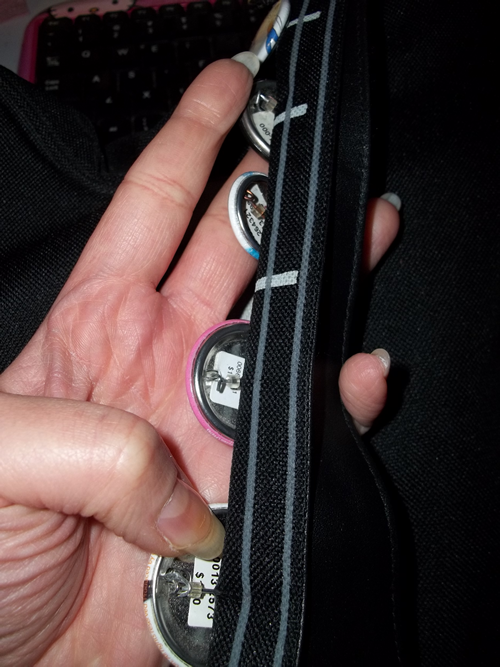
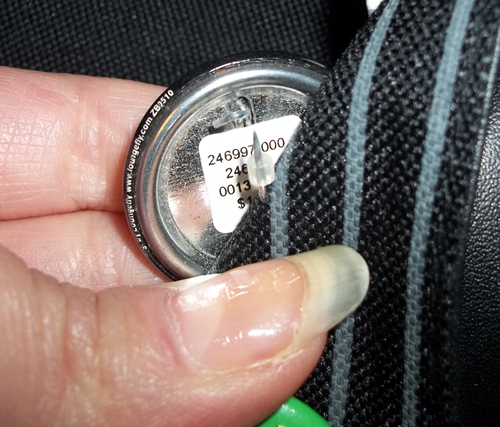
If you place them on the pinback of the button, just ahead of where it closes, the pins can’t slip off.
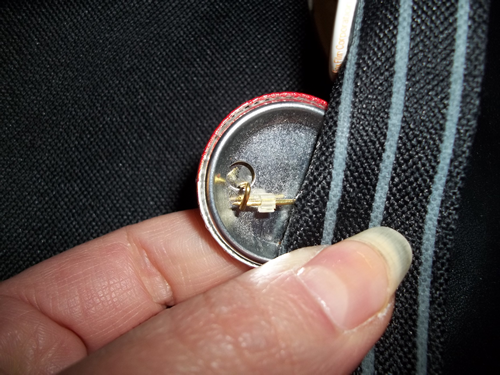
It doesn’t matter what size or shape the button is. Also, I happened to find one that wasn’t closed when I went to take pictures:
The earring back basically acts as a rubber stopper. They’re made specifically to NOT slide off in order to keep earrings in place, so they work just as well keeping buttons in place, even if the buttons aren’t closed.
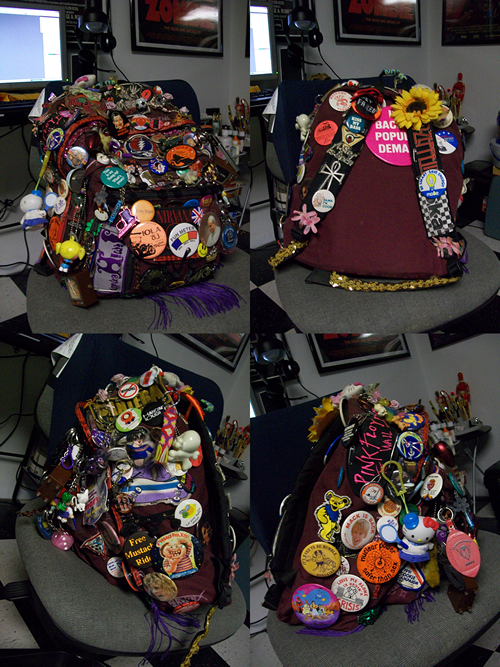
Considering the backpack that I had in high school…
…I can tell you with complete certainty that rubber earring backs are, bar none, THE best method of making sure you never lose another button ever again. Also, they’re cheaper than safety pins (which can also pop open, thus allowing the button to slide off) and you won’t have to poke extra holes in whatever you’re putting buttons on.
Or hell, combine the rubber earring backs WITH the safety pins! Your buttons will be COMPLETELY UNLOSE-ABLE!